The desk booking software that makes people want to come back to the office
Interactive floor plans, one-click booking, see where your colleagues are sitting: BeeMyFlex makes finding a desk a matter of seconds, from the web, mobile or Microsoft Teams.
Personalised demo · in French · no commitment
Without desk booking, flex office feels like a lottery
Removing assigned desks without a booking tool simply shifts the burden of organising onto your employees.
Hunting for a desk every morning
Arriving at the office and wandering from floor to floor looking for a free desk: the experience that makes remote work the better option. On busy days, some people just leave and work elsewhere.
Teams scattered across the floors
Coming to the office to collaborate, then ending up three floors away from your team. With no visibility over who sits where, physical proximity, the very reason for coming in, is no longer guaranteed.
Desks booked... and empty
Desks marked “occupied” that stay empty all day, zones reserved for teams that never show up: without real data, space is badly allocated and frustration builds.
Book a desk in 10 seconds
BeeMyFlex makes booking so simple and so visual that your employees adopt it in the very first week.
See your floors exactly as they are
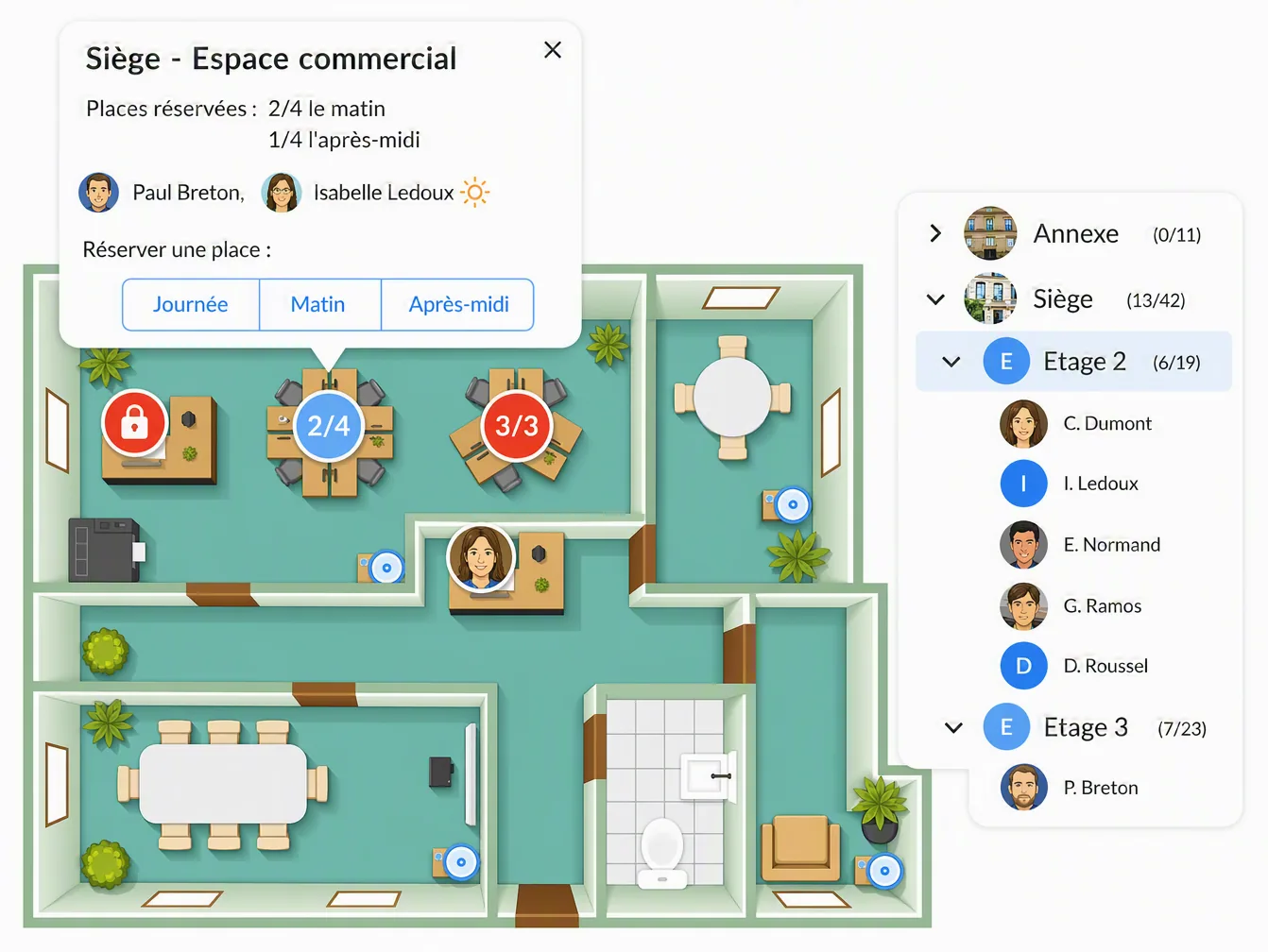
Every site is shown as its real 2D floor plan: zones, desks, break rooms. Occupancy counters by zone update in real time, and locked or restricted desks can be spotted at a glance. Move between sites and floors in one click.
- Real 2D plans of your floors, not abstract grids
- Real-time occupancy counters by zone
- Multi-site and multi-floor navigation
- Past and future views: check the floor plan for any day
The desk you need, booked in seconds
Click a free desk on the plan, confirm, and it is booked. Set favourite desks to go faster still, book several days ahead, and change or cancel just as easily. All from the web, the mobile app or Teams.
- Book directly from the floor plan
- Favourite desks for even faster booking
- Advance booking across several days
- Available on web, mobile and Microsoft Teams
Sit next to the right people
Before you book, see who is sitting where. Search for a colleague, spot your team on the plan, and take the desk next to them. Spontaneous collaboration, the real value of being on site, becomes possible again.
- See colleagues already seated on the floor plan
- Search for an employee by name
- Book right next to your team
You stay in control of how space is allocated
Reserve zones for specific teams, set priority desks for specific profiles, and temporarily close a floor under renovation with automatic notification to everyone who had booked there. Employee autonomy, within the framework you define.
- Zones and desks restricted by team or by profile
- Configurable priority desks
- Temporary closure with automatic notification
What changes with BeeMyFlex
Compare your employees' experience with and without desk booking.
- Searching floor by floor for a free desk
- Sitting far from your team for lack of visibility
- Desks “booked” that stay empty
- Tension over desks on busy days
- No data on how space is actually used
- Your desk booked before you even arrive
- Sitting next to your team, on a desk you picked from the plan
- Every booking matches an actual day in the office
- Busy days are visible in advance, everyone plans accordingly
- Occupancy data to manage your spaces
How to choose your flex office software in 2026
A neutral comparison matrix, the 30 questions to ask in a demo and the mistakes to avoid: everything you need to structure your project and pick the right solution for your company.
- The 4 evaluation criteria and the 60-point scorecard
- A ready-to-use vendor comparison matrix
- The 30 questions to ask during demos
- The 8 most common mistakes to avoid when choosing
By submitting this form, you agree to receive the guide by email. No spam. See our privacy policy.
Everything you need to know about flex office
Practical guides, comparisons and advice to roll out flex office successfully in your company.
Flex office at work: the complete 2026 guide
Definition, challenges, implementation steps and mistakes to avoid: everything you need to know to roll out flex office in your organisation.
Read the article ComparisonHow to choose your flex office software in 2026
Selection criteria, must-have features, questions to ask in a demo: the method for getting it right.
Read the article MethodFlex office: Excel or dedicated software?
The hidden costs of spreadsheet tracking, from admin time and data entry errors to unreliable data, versus what a dedicated tool delivers.
Read the article StrategyThe benefits of flex office for your company
Lower property costs, more flexibility, employer appeal, CSR: the concrete benefits, backed by figures.
Read the article ImplementationHow to implement flex office
From auditing your spaces to supporting your teams, the 7 steps to a successful move to flex office.
Read the article ComparisonFlex office software comparison 2026
An overview of the main solutions on the market: criteria, strengths and differentiators for each player.
Read the articleEverything about desk booking with BeeMyFlex
Answers to the most common questions about this feature.
Give your teams a desk booking experience they will actually use
Book a demo to see the BeeMyFlex interactive floor plans, and why our customers see immediate adoption among their employees.